Yearly Budget Template for Google Sheets and Excel: Plan All 12 Months
A yearly budget template lets you set your income, bills, savings and debt once for the whole year, then track each month against that plan. The advantage over a month-by-month budget is foresight: you see the December gift spending, the March insurance renewal and the summer trip before they land on a single month and wreck it.
Why plan the whole year
Monthly budgets tend to assume every month looks the same. Real life does not:
- Some bills arrive once or twice a year: car registration, insurance premiums, annual subscriptions.
- Income can change by month if you have variable hours, bonuses or a seasonal job.
- Spending spikes around holidays, birthdays and travel.
A yearly plan puts all of that on one page. Instead of being surprised in November, you know in January that November needs extra room.
What a yearly budget template should have
| Section | What goes in it |
|---|---|
| Income | Each source, with the amount expected per month |
| Fixed expenses | Housing, utilities, insurance, loan payments, subscriptions |
| Variable expenses | Groceries, fuel, dining out, personal, household |
| Savings | Emergency fund, goals, sinking funds for known costs |
| Debt | Balances, minimum payments and any extra you plan to add |
| Yearly summary | Planned versus actual for each category and month |
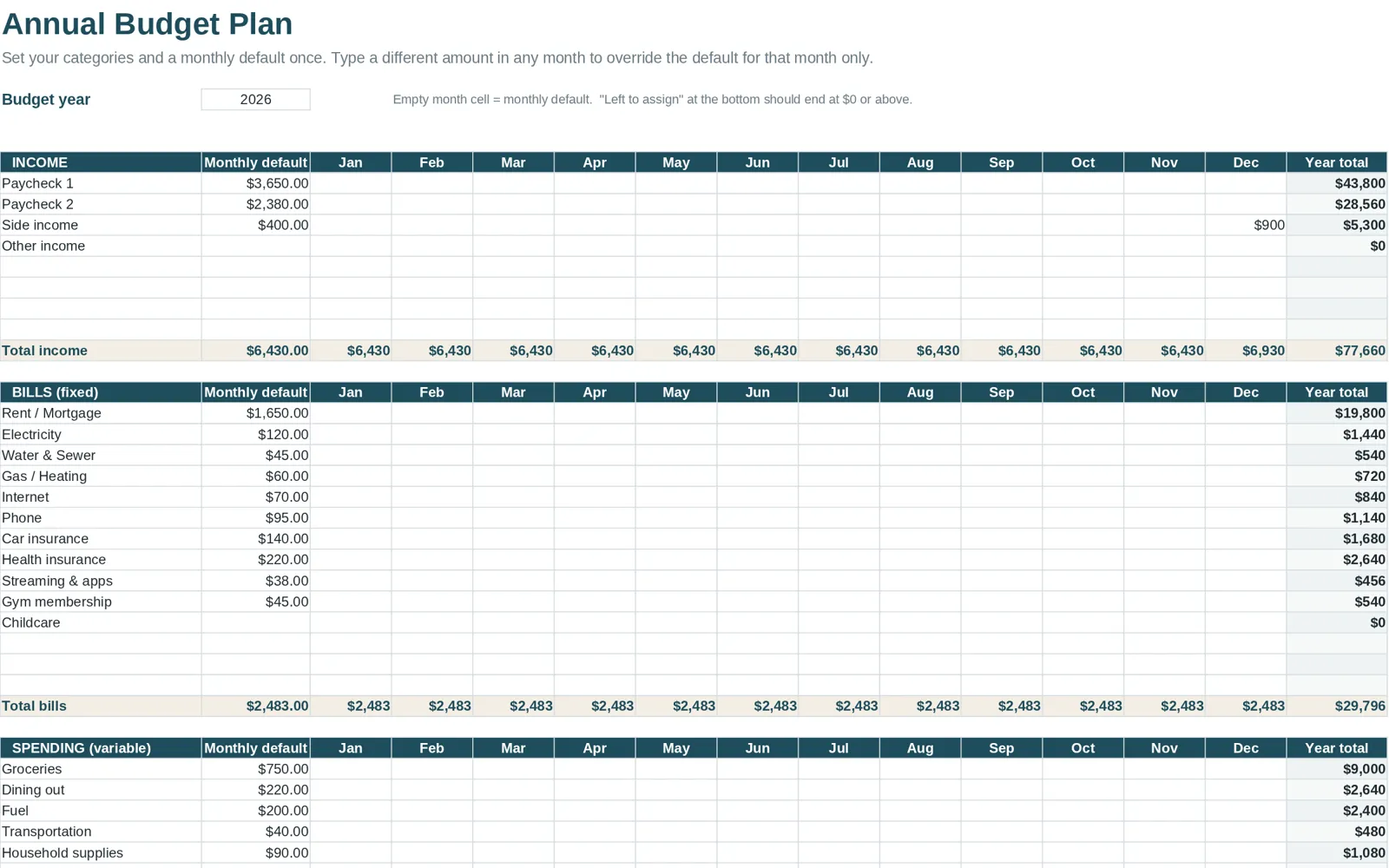
If your template only has a single column of numbers, it is a monthly budget with a year label. A real yearly template has twelve months, either as columns or as separate tabs, and totals that roll up.
How to set up a yearly budget step by step
- Gather twelve months of data if you can. Statements from the last year show the irregular costs you would otherwise forget.
- List income by month. Use take-home pay. If income varies, use a conservative figure.
- Enter fixed costs once. The template should carry them across all months.
- Add irregular costs in the month they happen. Then divide by twelve and set aside that amount monthly.
- Set planned amounts for variable categories. Base them on actual averages, not hopes.
- Assign every dollar. Income minus planned expenses, savings and debt payments should be zero or positive.
- Review quarterly. A yearly plan is a map, not a contract. Adjust at the end of each quarter.
Handling irregular costs with sinking funds
A sinking fund is a small monthly amount saved for a known future cost. Example: an insurance premium due in June is divided by twelve and set aside from the previous July onward, or by the months left if you start later. By the due date, the cash is already there. The cash is waiting when the bill arrives, and your monthly budget never has to absorb a surprise.
Good candidates for sinking funds:
- annual and semiannual insurance
- car maintenance and registration
- holiday gifts (see how much to spend on Christmas gifts)
- travel
- medical or dental costs you expect
Reading your year-end numbers
When the year is complete, a good summary lets you ask:
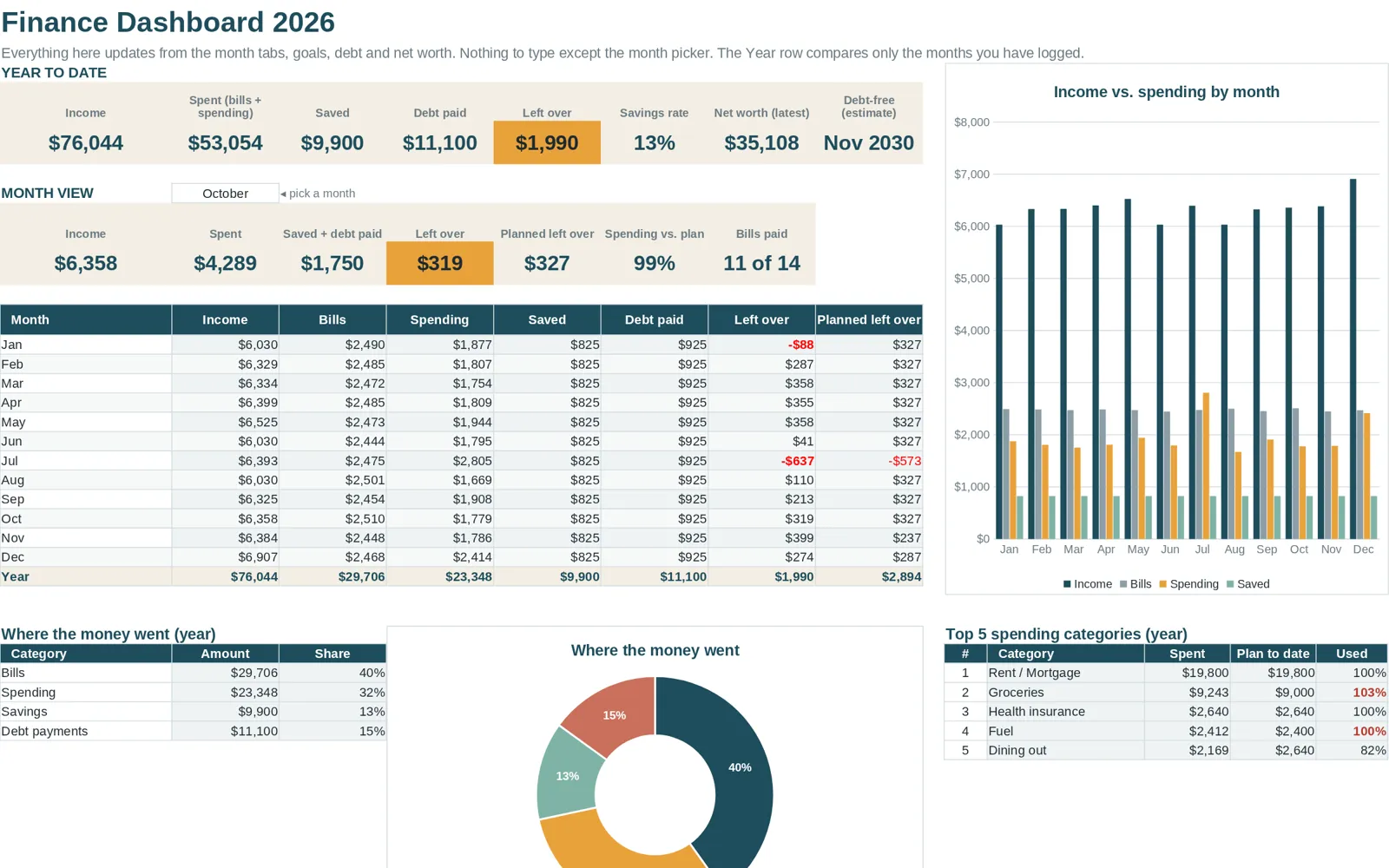
- Which categories were over plan most months?
- Which months were hardest, and was that predictable?
- How much did you save in total, and how does that compare with your goal?
- Did your debt balance fall as planned?
Those answers become next year's plan. This is where tracking pays off: every year's data makes the next plan more accurate.
Yearly plus monthly: how they fit together
The yearly plan sets amounts. The monthly tabs record what actually happened. If you want a closer look at the monthly side, see the monthly budget template guide. If you want a general overview of how spreadsheets for budgeting fit together, start with the budget spreadsheet guide.
How Clear Budget Planner handles the full year
Clear Budget Planner is built around this approach. Its Annual Plan tab is where you enter income, bills, variable expenses, savings and debt, and set a budget amount for each category. Twelve monthly tabs from January to December track transactions against that plan. The Dashboard and Year Summary roll up the numbers from all twelve months with charts. The workbook also has a Bill Tracker, Savings Goals, a Debt Payoff tab and a Net Worth tab.
You get a blank workbook and a filled-in example to see the year working with sample data, plus a Getting Started guide for Google Sheets and Excel. See the sample budget spreadsheet page for a tour of what the example looks like.
A quick checklist before you start
- [ ] Last year's bank and card statements are within reach
- [ ] You know your take-home pay for each month
- [ ] You have a list of yearly and semiannual bills
- [ ] You have chosen a weekly time to log spending
- [ ] You have a clean backup copy of the template