Debt Snowball Spreadsheet: How to Build a Payoff Plan
A debt snowball spreadsheet takes a list of debts and turns it into a month-by-month plan: pay the minimum on everything, put all extra money on the smallest balance, and roll each paid-off payment into the next debt. This guide shows the structure so you can build one, and what to check before you trust the results.
The snowball method in plain terms
- List all your debts.
- Order them from the smallest balance to the largest.
- Pay the minimum on every debt.
- Put every extra unit of money toward the smallest debt.
- When it is paid off, add its payment to the next smallest.
The "snowball" is the growing payment: after the first debt disappears, its minimum payment joins the extra money, so the payment on the next debt is larger.
What your spreadsheet needs
Inputs
| Column | What it holds |
|---|---|
| Debt name | Credit card A, car loan, student loan and so on |
| Balance | What you owe today |
| APR % | The annual interest rate |
| Minimum payment | The smallest payment each month |
Plus two single cells: extra payment per month and start month.
Calculated pieces
- Snowball order. Rank the debts by balance, smallest first. A formula can do this so it updates when balances change.
- Total monthly budget. Add all minimums to the extra payment. This total stays the same every month. When a debt is paid off, its minimum is not removed from the budget; it moves to the next debt.
- A monthly schedule. For each month, each debt's balance after interest and payment. Interest is estimated as APR ÷ 12 times the previous balance.
- A summary. Months until all debts are paid, the estimated debt-free date and total interest.
How the schedule works
For each month and each debt:
- Add one month of interest: previous balance × (APR ÷ 12).
- Subtract the minimum payment.
- If it is the target debt (the smallest unpaid balance), subtract the extra payment too.
- If the balance reaches zero, any leftover payment moves to the next debt.
Repeating this down 240 rows (20 years) gives a full picture. If a debt is still not paid after 20 years, the payments are too low for the plan to work.
A small example
Three debts and an extra payment of 200 per month:
| Debt | Balance | APR | Minimum |
|---|---|---|---|
| Store card | 650 | 27.9% | 35 |
| Credit card | 1,800 | 19.9% | 54 |
| Car loan | 9,800 | 7.2% | 310 |
The monthly budget is 35 + 54 + 310 + 200 = 599. Under the snowball order, the store card takes the extra payment first, with 235 going to it each month. When the store card is cleared, 235 moves to the credit card, so the credit card now gets 289 each month, and so on. These numbers are made up and the exact timing depends on real rates and fees.
Snowball and avalanche side by side
The other common method, the avalanche, orders debts by interest rate, highest first, instead of by balance. Because it targets the costliest debt first, it usually costs less in interest. The snowball produces early wins by clearing small debts first. Which matters more depends on you. A good spreadsheet shows both plans with the same inputs so you can compare dates and interest. See debt snowball vs avalanche for a neutral comparison.
Things to check before you trust the numbers
- Balances and rates are current. Use the latest statement.
- Minimums are right. Credit card minimums can change as balances fall.
- Fees and promotional rates. Introductory rates that expire, late fees and annual fees are not in a simple model.
- Interest method. Monthly APR ÷ 12 is an estimate. Statements may compute daily.
- You pay every month. A missed payment changes the outcome.
- Extra payment is realistic. Use an amount you can keep up.
Where the extra money comes from
The extra payment has to come from somewhere. That is a budgeting question, not a spreadsheet question. A common way is to list all your bills first, see what is left after buckets are funded, and decide how much of that goes to debt. The method is in how to budget a paycheck. If you are starting a budget from scratch, the budget reset checklist includes a Money Map page for listing debts, subscriptions and accounts.
If income is tight, see low income budgeting. Contacting lenders early is often better than falling behind, and a nonprofit credit counselor can help you review options.
Using a ready-made planner
Bucket Budget Planner includes a Debt Payoff Planner in Excel that does the above. On the Debts tab you enter up to 15 debts with their balance, APR and minimum payment, plus an extra monthly payment and a start month. The Compare tab shows the snowball and the avalanche plans side by side, with months to debt-free, an estimated debt-free date, total interest paid and total paid, and a balance chart. The Snowball and Avalanche tabs have the month-by-month schedules for up to 240 months.
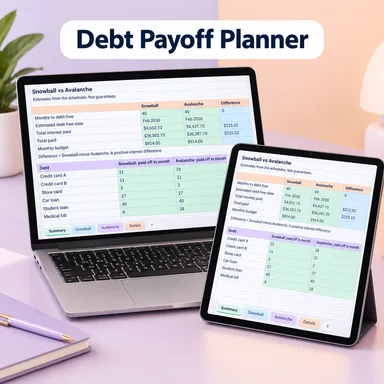
The planner states that its results are estimates, not guarantees. The file uses standard formulas, so it works in Google Sheets and Excel. The main budget planner is included as well, so you can find the extra payment in your own numbers.
This guide is general information, not financial advice. It does not tell you which payoff method to choose.