Sinking Funds Tracker: How to Set One Up and Use It
A sinking funds tracker is a list of your future expenses with a target, a due date and a running balance for each. It tells you how much to set aside from each paycheck and whether you are on schedule. You can build one in a spreadsheet in about twenty minutes. This guide shows the columns, the formulas and a monthly routine.
If you are new to the idea, begin with what are sinking funds, then return here.
What the tracker needs to show
| Column | Meaning |
|---|---|
| Fund | Name, such as Car insurance or Holiday gifts |
| Target | The amount needed by the due date |
| Due date | When the money is needed |
| Saved so far | The current balance |
| Remaining | Target minus saved |
| Paychecks left | Number of paydays until the due date |
| Per paycheck | Remaining ÷ paychecks left |
| Status | On track, behind or complete |
Three of these columns are calculated, so you only update the saved balance.
The formulas
If your sheet has the target in column B, the saved amount in column D and the paychecks left in column F:
- Remaining: = B − D
- Per paycheck: = (B − D) ÷ F
- Status: = if the saved amount is at least the target, "Complete"; otherwise compare the balance with where it should be by now
To find paychecks left, count the paydays between today and the due date. With a biweekly schedule, divide the number of days by 14 and round down.
A sample layout
Imagine a biweekly schedule and the following funds. Amounts are illustrative:
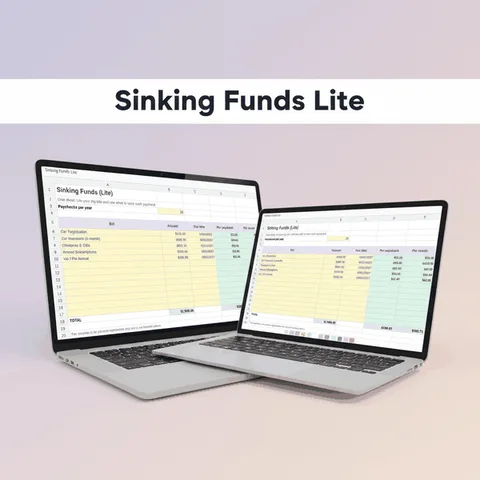
| Fund | Target | Due | Saved | Paychecks left | Per paycheck |
|---|---|---|---|---|---|
| Car insurance | 600 | in 6 months | 150 | 13 | 34.62 |
| Vehicle registration | 150 | in 4 months | 40 | 9 | 12.22 |
| Holiday gifts | 500 | in 10 months | 100 | 21 | 19.05 |
| Vet checkup | 200 | in 8 months | 0 | 17 | 11.76 |
| Total per paycheck | 77.65 |
Adding the per-paycheck column shows what to set aside overall. If that is more than your budget can carry, adjust the targets, extend the dates or drop a fund for now.
Setting up your first tracker
- Pick three to five funds. Start with expenses that have caught you off guard before.
- Write the target and due date for each. Use last year's bill as a base.
- Enter what you already have for each fund, or zero if nothing.
- Count the paychecks left until each due date.
- Read the per-paycheck column, add it up and compare it with your budget.
- Move money on payday. Update the saved column when you do.

A monthly routine
Trackers fail when they are not updated. A short routine helps:
- Each payday: add the per-paycheck amount to each fund's balance.
- Each month: look at the funds due in the next three months. Are they on track?
- After a bill is paid: reduce the balance and reset the target for next year.
- Each quarter: review the list. Add a fund if a surprise got through, and remove one that is no longer needed.
A printed calendar makes the due dates visible. The 2027 bill calendar has a yearly overview page for exactly that. To choose funds, see sinking funds categories and examples.
Where the money lives
The tracker records numbers. The money itself sits in an account. Options include:
- A savings account with sub-accounts or labeled pockets, if your bank offers them.
- A single savings account with the tracker showing each fund's share.
- A separate savings account for larger funds, such as a car or a trip.
The important thing is that the account balance and the tracker total agree. Check once a month.
Mistakes to avoid
- Updating only when you remember. Tie it to payday.
- Letting a fund pay for something else. If you borrow from one, write down the repayment.
- Not resetting after the bill. The next cycle starts immediately.
- Too many funds at once. A long list is tiring. Add them gradually.
What is included in Bucket Budget Planner
Bucket Budget Planner does not need a dedicated sheet for each fund because it treats every future cost as a bucket. On the Buckets tab you enter the cost with its frequency (annual, quarterly, monthly and so on), and the sheet shows what to set aside per week, per paycheck, per month and per year. The Dashboard adds all the buckets together and compares them with your income. Monthly tabs let you record what you actually spent.
The included web app has a Sinking Funds Calculator: enter a goal, how much you have already saved and a target date, and it shows the amount to set aside per week or per paycheck. Its Annual Bills Calendar places yearly and quarterly bills by month, and its Savings Goal Tracker follows progress toward each goal. A library of 154 common buckets includes many annual and seasonal costs, and the 2027 Bill Calendar is a printable PDF.
A separate, more detailed Sinking Funds & Annual Bills Planner exists as an optional add-on and is not part of the main download.
For a routine to compare plans with actual spending, see the monthly spending tracker guide.
This guide is general information, not financial advice.